Getting Your VPS Login Details
Last reviewed: June 2, 2026
Step 5
Please wait 3-5 minutes after your installation is complete!
Check your junk/spam/promotions/inbox folders for the incoming email.
To find your VPS log information you will need to go to your email inbox and, as previously mentioned, locate the email you will have received after your installation has finished titled "Your VPS Server is Ready at 1of1 Servers!".
It will contain:
- Your IPv4 Address (4 - 12 digits): ###.###.###.###
- Port (4 digits): ####
- Username:
- "Administrator" (Windows) or "Root" (Debian/Ubuntu)
- Password (20 characters): 9HL0n2Wjm6n2JA1dTr4a (example)
If you still have not received the email, that's totally fine, you can use your dashboard to grab all the information you need to log into Remote Desktop.
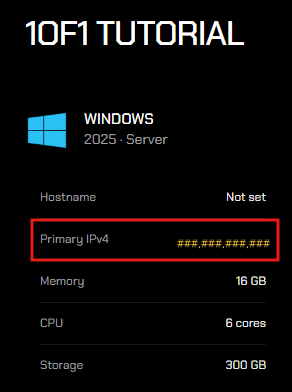
Your IP address can be found in your VPS menu, listed as Primary IPv4 alongside your server's specifications (see below).
Use that for Remote Desktop along with the default username Administrator.
For your password, you'll need to reset it. Learn how to to that here.
 Reset Password and RDP Credentials
Proceed to Logging into Remote Desktop if you chose the Windows OS for your VPS (Step 6a)
Proceed to Logging into VPS Linux OS if you chose either Debian or Ubuntu OS for your VPS (Step 6b)