RDP Errors
Last reviewed: June 2, 2026
Remote Desktop Connection (RDP)
One of the most common issues happens with the RDP program on windows, the tool you use to remotely log into your server(s).
You will run into the following error message:
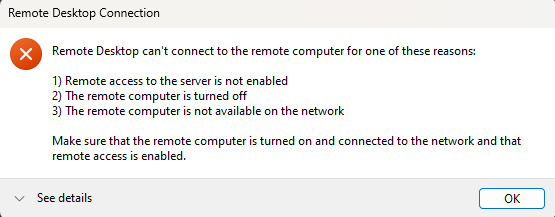
This error can occur for a list of reasons including, but not limited to:
Your VPS Server was only just built and is still establishing a connection.
- Allow 5-30 minutes, and try again
- If the error message still appears, proceed to the following
Your VPS Server experienced an issue with the automatic building process.
- You have now waited up to 30 minutes and tried but failed to connect through RDP with the same error as a result.
- Go to your VPS Dashboard and rebuild your VPS

- Go through the rebuilding process, then attempt to connect through RDP once more (after up to 30 minutes!)
Your VPS Server has been established for a while with no prior issue, but you are experiencing this error randomly.
- Your VPS Server may simply require a restart! That's right, the reliable "turn it off and turn it back on" method.
- Go to your VPS Dashboard and restart your VPS

- Allow a couple of minutes for the restart, then try your connection again
However unlikely, it is still a possibility that our networks may be having hiccups which could block you from establishing a connection to your server.
To check on the status of our networks, go to our Network Status Page, find your servers location on the list and verify the network status in real time.