Players & Bans
Last reviewed: October 3, 2026
The Players & Bans page lets you view player accounts and manage bans on your Kingdom Come Deliverance 2 server.
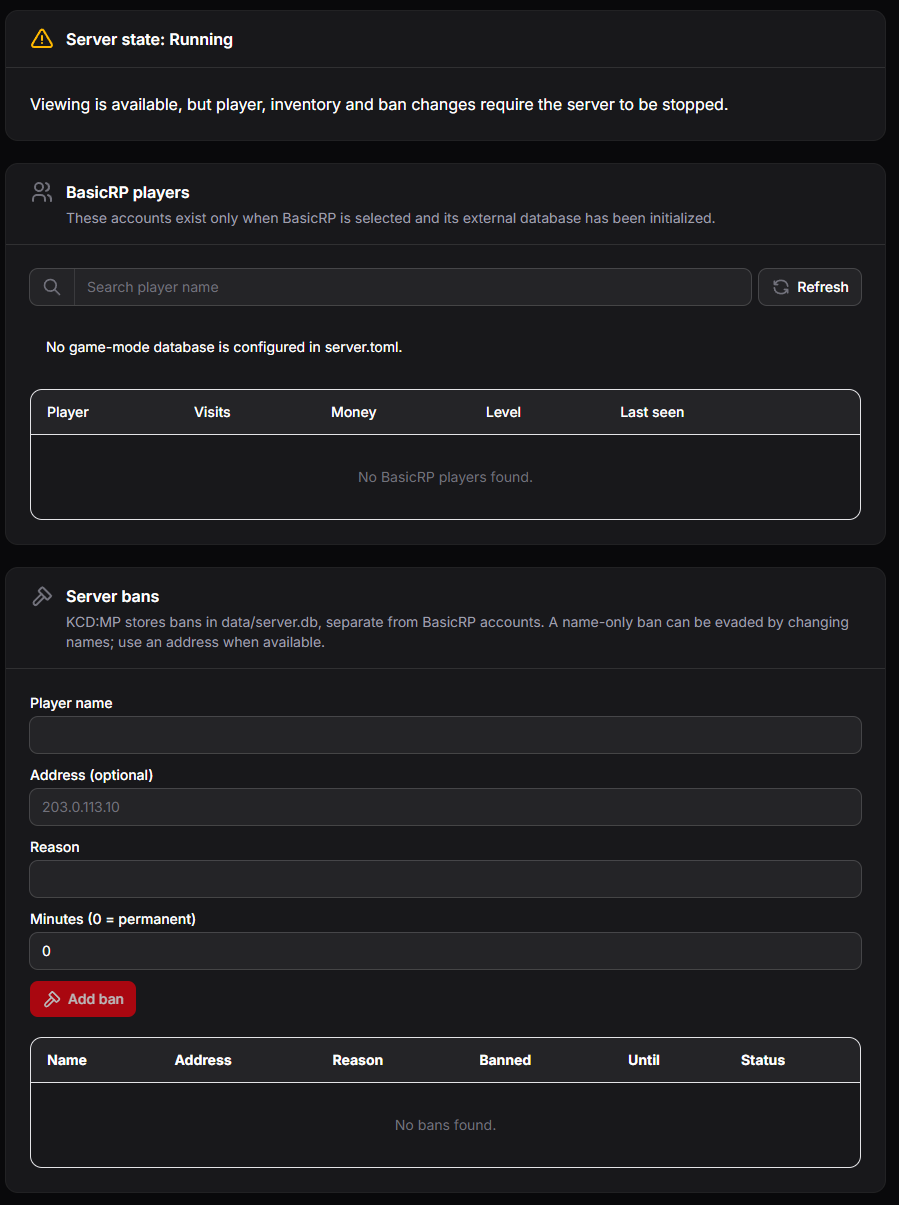
Server State
The top of the page shows whether your server is running.
You can view players and bans while the server is running, but changes to players, inventories, and bans require the server to be stopped.
BasicRP Players
Lists player accounts for the BasicRP game mode, showing each player's visits, money, level, and when they were last seen. Use the search bar to find a player by name, and click Refresh to update the list.
This list only appears when BasicRP is your selected game mode and its database has been set up. If no database is configured, connect one in the Game Mode Database section of KCD:MP Settings.
Server Bans
Bans are stored separately from BasicRP accounts, so they apply to every game mode.
To ban a player:
- Stop your server from the Console.
- Enter the Player name.
- Enter the player's Address (IP), if you know it.
- Enter a Reason for the ban.
- Enter the ban length in Minutes. Use
0for a permanent ban. - Click Add ban.
A ban by name alone can be avoided by changing names. Include the player's address whenever possible.
The ban list shows each ban's name, address, reason, when it was issued, when it expires, and its status.
Have staff helping you moderate? You can give them dashboard access from the Users page.