Car Pack Installation
Last reviewed: June 2, 2026
Packing your cars into one resource allows for better optimization of your city. Rather than loading 200 different folders, you can stream all vehicles under one resource folder.
You cannot car pack cars that are encrypted. You can tell if they're encrypted if the folder comes with a .fxap
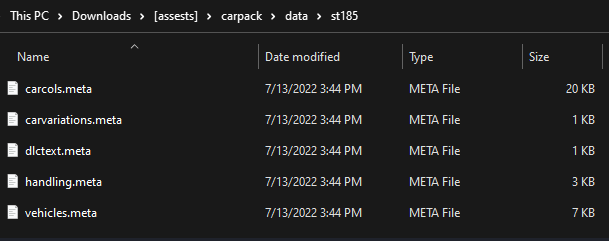
- In the car packs "data" folder, create a new folder with the spawn code of the vehicle.
- As you can see in the image below, the spawn name of the car is st185.
- Inside the st185 folder is where all the .meta files should be stored.
- This keeps everything organized in case you want to edit the handling of any metadata.
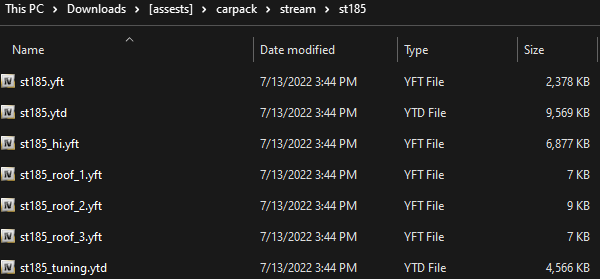
- In the car packs "stream" folder, create another new folder with the spawn code of the same vehicle as before.
- As you can see in the image below, the spawn name of the car is st185.
- Inside the st185 folder, within the "stream" folder, is where all the .yft, .ytd & any other streaming files will be stored.
- This makes things organized in case you need to edit liveries in the future.
For the fxmanifest, you need to specify what to load so it reads the .meta in the resources.
To add more cars, follow the same steps.
- Create two folders, one in data and one in stream.
- Drop all .meta files on your data folder
- Drop all .yft, .ytd stream files on your stream folder.
- Remember to name the folders the same as your spawn code (the same as the stream .yft file)
Adding cars to QBCore
Add the cars to your qb-core > shared > vehicles.
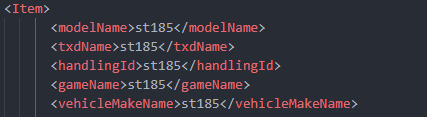
Make sure the spawn names match the names found inside of your vehicles.meta or the car will not be able to be stored in the garage or you won't be able to do /admincar.
ZeroDream Mod - Click here to open it. This is an AMAZING TOOL everyone should be using! It will grab any gta5mods.com cars and will convert it to FiveM ready on your behalf. No more OpenIV struggle. It is perfect for my method above.
Handling Editor - Click here to open it. Another AMAZING TOOL for setting proper handling for all of your cars.
We do not offer any support other than what is found on this guide. Please do not ask us for any support or open tickets about this, they will be auto closed.